



Program Overview
Join Advantage Software for two days of practical, workflow-focused training designed specifically for Eclipse and EclipseVox users. Whether you're looking to improve realtime accuracy, maintain a healthier Dragon SRE, learn Speechmatics, produce cleaner rough drafts, improve your audio workflow, or take advantage of Boost, this program delivers hands-on training you can immediately apply to your daily work.
Designed as part of the NVRA Pre-Convention Training, these sessions combine live demonstrations, real-world examples, workflow walkthroughs, guided discussion, and Q&A to help you work faster, write cleaner, and get more out of your Eclipse software.
Who Should Attend?
This training is ideal for voice writers and Eclipse/EclipseVox users of all experience levels. Several sessions, including those covering rough drafts, audio, and Boost workflows, are appropriate for all Eclipse users regardless of capture method.
Meet Your Instructors
SRE Maintenance • Rough Draft Workflows

Boost Vocabulary & Productivity
What You'll Learn
- Improve Dragon recognition through better settings, vocabulary management, correction techniques, and SRE maintenance.
- Create an effective maintenance routine to keep your EclipseVox profile performing at its best.
- Produce cleaner, more accurate rough drafts with practical editing strategies and workflow tips.
- Configure and optimize EclipseVox with Speechmatics for improved realtime performance.
- Improve audio recording, monitoring, playback, and troubleshooting techniques within Eclipse.
- Get more from Boost using specialty dictionaries, suggestions, exclusions, logging, and vocabulary management tools.
Click the tabs below to view detailed descriptions of each session.
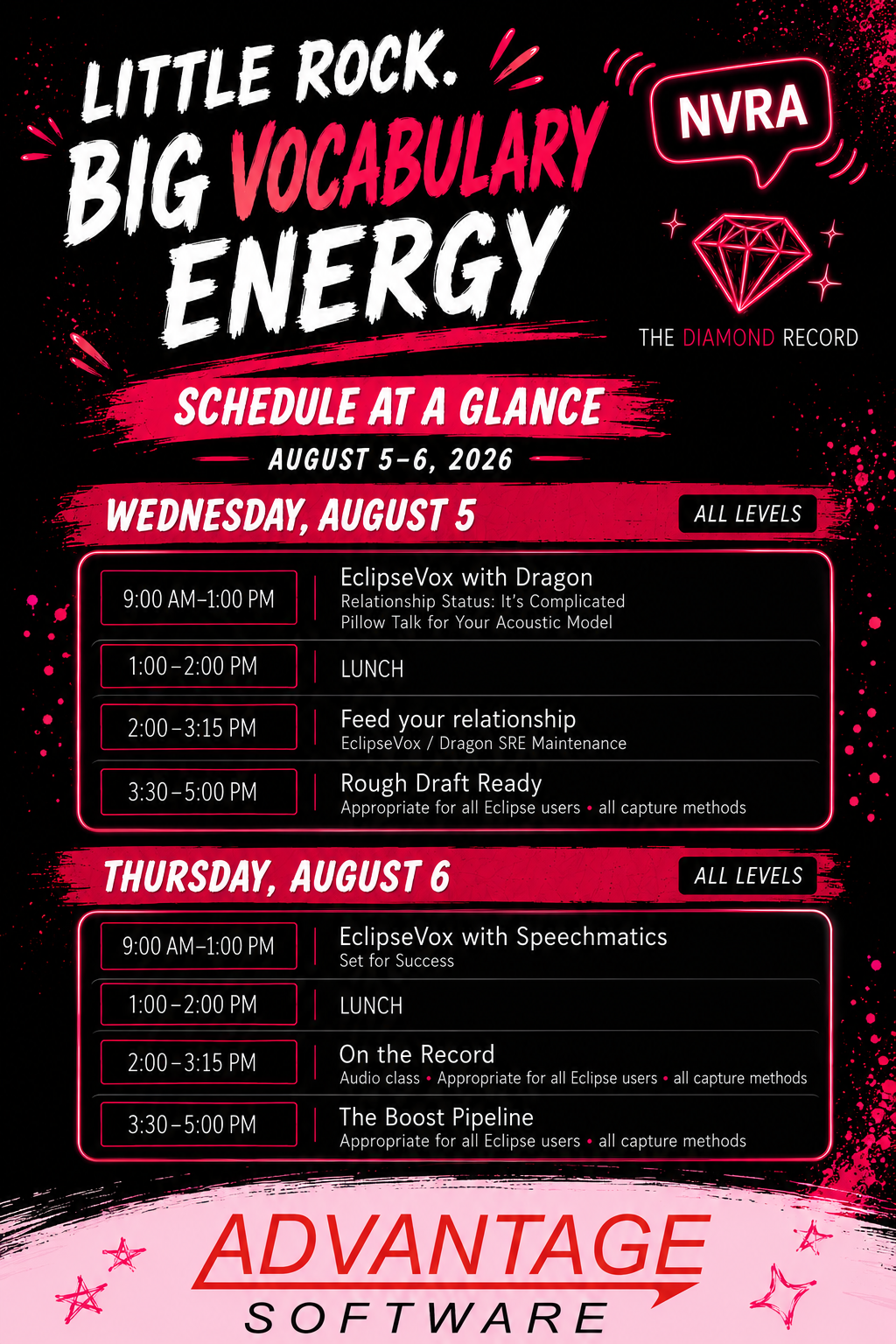
Schedule
Wednesday, August 5 | Dragon, SRE Maintenance & Rough Drafts
| Time | Session | Instructor | Focus | Hours |
|---|---|---|---|---|
| 9:00 AM-1:00 PM | EclipseVox with Dragon | Amy Armstrong | Relationship Status: It's Complicated; Pillow Talk for Your Acoustic Model | 4.0 |
| 1:00-2:00 PM | Lunch | Non-instructional | 0 | |
| 2:00-3:15 PM | Feed Your Relationship | Amy Armstrong | EclipseVox / Dragon SRE Maintenance | 1.25 |
| 3:30-5:00 PM | Rough Draft Ready | Amy Armstrong | Appropriate for all Eclipse users and all capture methods | 1.5 |
Thursday, August 6 | Speechmatics, Audio & Boost Workflows
| Time | Session | Instructor | Focus | Hours |
|---|---|---|---|---|
| 9:00 AM-1:00 PM | EclipseVox with Speechmatics | Amy Armstrong | Set for Success | 4.0 |
| 1:00-2:00 PM | Lunch | Non-instructional | 0 | |
| 2:00-3:15 PM | On the Record | Ashli Van Dyke | Audio class; appropriate for all Eclipse users and all capture methods | 1.25 |
| 3:30-5:00 PM | The Boost Pipeline | Ashli Van Dyke | Appropriate for all Eclipse users and all capture methods | 1.5 |
Checkout Option Guide
At checkout, please select the option that matches the portion of training you plan to attend:
| Checkout Option | Price | Includes | Hours |
|---|---|---|---|
| Wednesday Morning | $175 | EclipseVox with Dragon (9:00 AM-1:00 PM) | 4.0 |
| Wednesday Afternoon | $125 | Feed Your Relationship & Rough Draft Ready (2:00-5:00 PM) | 2.75 |
| Wednesday All-Day | $275 | All Wednesday sessions | 6.75 |
| Thursday Morning | $175 | EclipseVox with Speechmatics (9:00 AM-1:00 PM) | 4.0 |
| Thursday Afternoon | $125 | On the Record & The Boost Pipeline (2:00-5:00 PM) | 2.75 |
| Thursday All-Day | $275 | All Thursday sessions | 6.75 |
| 2-Day All-Access Pass (Best Value) | $495 | Complete access to every training session on Wednesday and Thursday. | 13.5 |
Note: Lunch is not included in the instructional hour total.
EclipseVox with Dragon
Wednesday Morning, August 5 • 9:00 AM - 1:00 PM
All Levels • Dragon-Centered • 4.0 Instructional Hours
Course Description
Before you break up with Dragon, check the relationship settings. This extended session gives voice writers a practical framework for improving Dragon recognition inside EclipseVox. You'll explore how user settings, vocabulary, dictionary entries, dictation habits, correction techniques, and acoustic model adaptation all work together to improve realtime accuracy.
Rather than abandoning a profile or starting over, you'll learn a repeatable workflow for diagnosing recurring recognition issues, making meaningful corrections, and maintaining Dragon in a way that supports cleaner realtime output and long-term performance.
What You'll Learn
- Identify EclipseVox and Dragon settings that affect recognition quality and realtime reliability.
- Analyze recurring misrecognitions to determine whether the cause is vocabulary, dictionary structure, user settings, dictation habits, or correction practices.
- Apply dictation techniques that improve machine recognition and acoustic model adaptation.
- Distinguish corrections that reinforce accuracy from corrections that create additional recognition problems.
- Build a sustainable maintenance routine that keeps Dragon performing at its best over time.
Perfect For
- Current EclipseVox users
- Voice writers looking to improve Dragon accuracy
- Reporters struggling with recurring recognition issues
- Users wanting cleaner realtime output
- Anyone looking for a structured approach to Dragon maintenance and optimization
Feed Your Relationship
Wednesday Afternoon, August 5 • 2:00 PM - 3:15 PM
All Levels • EclipseVox / Dragon SRE Maintenance • 1.25 Instructional Hours
Course Description
Healthy speech recognition requires consistent maintenance—not constant repetition. In this practical session, you'll learn how to strengthen your speech recognition engine by building a purposeful maintenance routine using documents, vocabulary resources, and EclipseVox tools.
Discover how to choose effective source material, use Analyze Documents and related vocabulary tools more strategically, and create a repeatable workflow that reinforces recognition, improves comprehension, and produces cleaner realtime output with less effort.
What You'll Learn
- Select useful source documents and vocabulary materials for speech recognition reinforcement.
- Use Analyze Documents and related vocabulary tools with a clear workflow purpose.
- Connect vocabulary preparation to cleaner realtime output and more efficient editing.
- Create a practical maintenance routine that supports ongoing SRE improvement.
Perfect For
- EclipseVox users looking to improve recognition accuracy.
- Voice writers who want a structured SRE maintenance routine.
- Reporters interested in building stronger vocabulary resources.
- Anyone looking to reduce editing time through better preparation.
- Users who want cleaner, more consistent realtime performance.
Rough Draft Ready
Wednesday Afternoon, August 5 • 3:30 PM - 5:00 PM
All Levels • All Eclipse Users • All Capture Methods • 1.5 Instructional Hours
Course Description
When the rough draft order comes in and the deadline is tight, workflow matters. This practical session prepares reporters to produce cleaner, faster, and more professional rough drafts without sacrificing confidence in the record.
You'll learn a proven workflow for transcript triage, realistic editing priorities, quality-control techniques, and Eclipse tools that help streamline preparation under pressure. Whether you're new to rough drafts or looking to refine your process, you'll leave with practical strategies you can immediately apply to your daily work.
What You'll Learn
- Build a rapid rough-draft workflow for high-pressure transcript requests.
- Prioritize edits that have the greatest impact on readability, usability, and client confidence.
- Use Eclipse tools and workflow habits to prepare rough drafts more efficiently.
- Apply quality-control standards appropriate for professional rough-draft delivery.
Perfect For
- Court reporters who regularly provide rough drafts.
- Eclipse users looking to speed up transcript production.
- Reporters working under demanding turnaround times.
- Anyone wanting a more consistent, efficient rough-draft workflow.
- Users looking to improve quality while reducing editing time.
```
EclipseVox with Speechmatics
Thursday Morning, August 6 • 9:00 AM - 1:00 PM
All Levels • Voice Writing Theory • 4.0 Instructional Hours
Course Description
Everyone is talking about Speechmatics. This comprehensive session moves beyond the buzz to give voice writers a practical foundation for using Speechmatics with EclipseVox. You'll learn not only how to configure the system, but why each component affects recognition quality and transcript output.
Topics include Voisteno, pronunciations, voice codes, punctuation theory, vocabulary setup, document analysis, and realtime workflow design. By the end of the session, you'll have a solid understanding of the building blocks that support accurate, efficient Speechmatics voice writing inside EclipseVox.
What You'll Learn
- Understand the core building blocks of Speechmatics voice writing theory, including Voisteno, pronunciations, and voice codes.
- Connect vocabulary choices, punctuation theory, and voice-code structure to cleaner transcript output.
- Use Setup Vocabulary and document-analysis workflows to improve Speechmatics recognition within EclipseVox.
- Identify practical setup and workflow considerations for reliable realtime voice writing.
- Develop a foundation for evaluating Speechmatics output and troubleshooting theory-related issues.
Perfect For
- Voice writers interested in using Speechmatics with EclipseVox.
- Current EclipseVox users looking to expand their workflow.
- Reporters transitioning to Speechmatics voice writing.
- Users who want to better understand Speechmatics theory and configuration.
- Anyone looking to build a stronger foundation for realtime success.
```
On the Record
Thursday Afternoon, August 6 • 2:00 PM - 3:15 PM
All Levels • Audio Workflows • All Eclipse Users • All Capture Methods • 1.25 Instructional Hours
Course Description
Great transcripts start with great audio. This practical session helps court reporters improve the quality and reliability of their audio workflows by focusing on capture, playback, live monitoring, recording setup, and troubleshooting techniques that prevent problems before they occur.
You'll learn best practices for evaluating audio quality in real time, diagnosing common recording issues, and building dependable workflows that support cleaner realtime output, more efficient editing, and greater confidence throughout the transcript production process.
What You'll Learn
- Set up audio capture and playback workflows that support reliable recording and review.
- Use live monitoring, waveform information, and recording indicators to evaluate audio quality while working.
- Troubleshoot common audio problems involving source selection, recording levels, channels, and playback.
- Understand how clean audio improves realtime support, scoping, editing, and transcript production.
Perfect For
- All Eclipse users, regardless of capture method.
- Court reporters looking to improve recording quality and reliability.
- Reporters who rely on audio for editing, scoping, or transcript production.
- Users wanting to prevent common recording issues before they happen.
- Anyone seeking a more dependable audio workflow from start to finish.
```
The Boost Pipeline
Thursday Afternoon, August 6 • 3:30 PM - 5:00 PM
All Levels • All Eclipse Users • All Capture Methods • 1.5 Instructional Hours
Course Description
BVE isn't just a vibe. It's a workflow. This practical session shows you how to put Big Vocabulary Energy into action through the complete Boost pipeline. Learn how thoughtful vocabulary management and Boost workflows work together to improve recognition, streamline editing, and produce cleaner transcript output.
We'll cover vocabulary preparation, specialty dictionaries, Boost workflow options, suggestion review, setup considerations, exclusions, logging, and minute management. You'll leave with a repeatable process that helps you get the most from Boost while building a more efficient transcript-production workflow.
What You'll Learn
- Understand the role of Boost workflows in vocabulary preparation, realtime support, and editing efficiency.
- Prepare and manage vocabulary resources and specialty dictionaries with a defined purpose.
- Apply setup, exclusion, logging, and minute-management practices that support an effective Boost workflow.
- Interpret Boost suggestions and integrate them into a repeatable transcript-production process.
Perfect For
- All Eclipse users interested in improving vocabulary management.
- Reporters looking to increase recognition accuracy and editing efficiency.
- Users wanting to get more value from Boost workflows and suggestions.
- Court reporters working with specialized terminology and custom dictionaries.
- Anyone seeking a more streamlined, repeatable transcript-production process.
```